
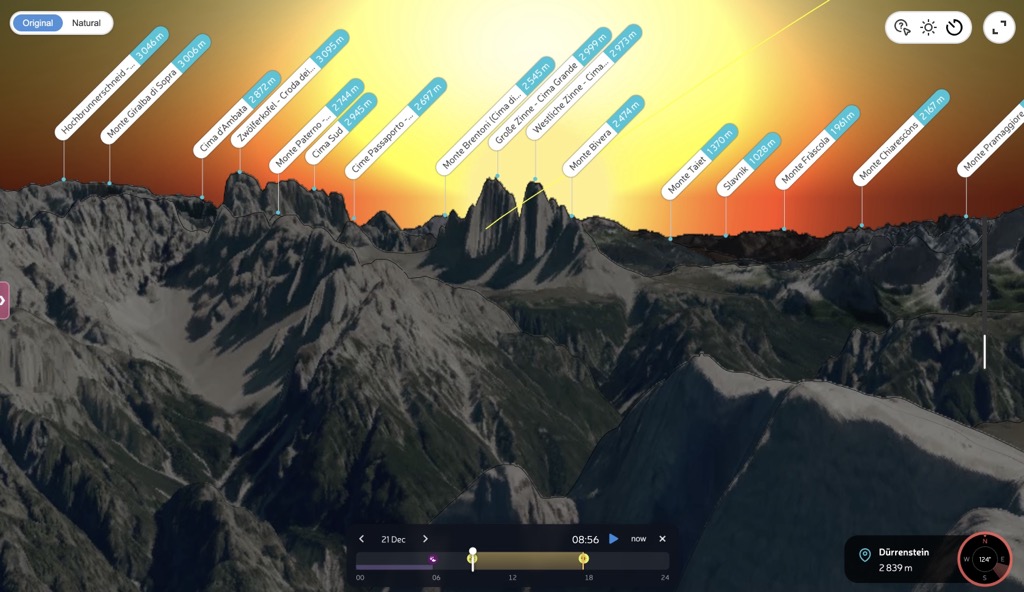
Around the winter solstice, photographers climb Dürrenstein in the dark to see the Sun rise between the Tre Cime di Lavaredo. The towers stand about ten kilometres to the southeast. From the summit, you can watch the Sun appear in the notch between Cima Grande and Cima Ovest.
A sunrise time alone won't tell you when to take this photograph. You need to know where the Sun will appear against the mountains, and which dates put it in the gap.
In PeakVisor Panorama 3D, you can check that view before carrying a camera and tripod up the mountain. Choose your shooting position and date, then move through the morning to see the Sun's path across the skyline.
When the Sun Clears the Ridge
The sky can already be bright while the Sun is still hidden behind a ridge. A sunrise calendar assumes an open horizon; from your camera position, mountains may block the view for longer.
PeakVisor calculates when the Sun and Moon cross the skyline seen from your chosen point. The times show when the Sun becomes visible from your camera position, not when a particular mountain face catches the light.
For the Tre Cime photograph, move slowly through sunrise in the panorama. You can compare the towers silhouetted against the brightening sky with the moment the Sun appears between them.
The Date Moves the Sun Along the Skyline
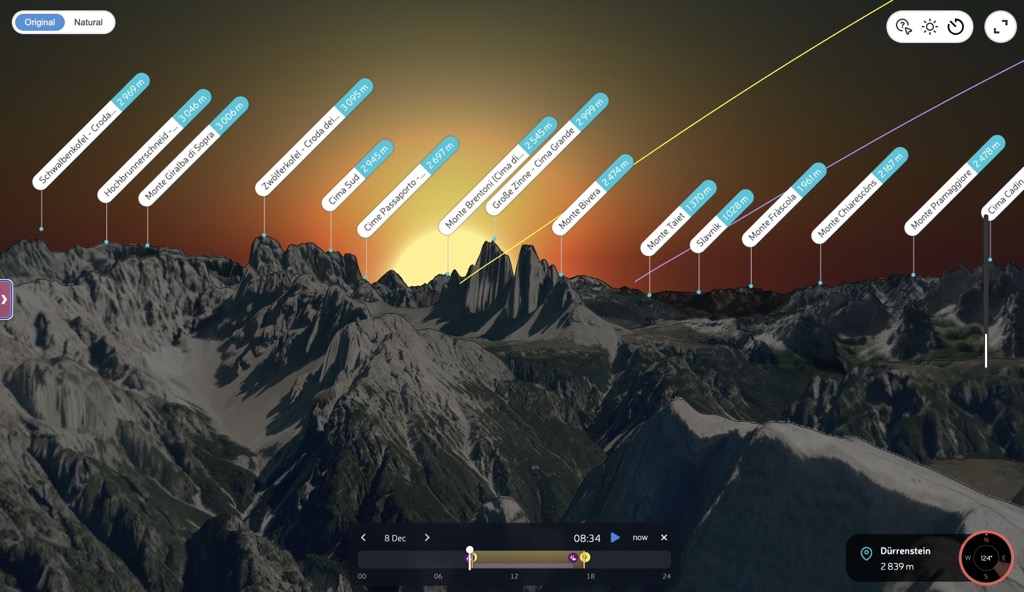
Keep the same viewpoint and change the date. In our December 2026 preview, the Sun's path meets the flank of Cima Grande on 8 December, then passes through the notch near the solstice on 21 December.
Around the solstice, the sunrise direction changes very little from day to day. Compare nearby dates to find other mornings that suit your composition. Having several options lets you choose according to the weather, rather than relying on a single day.
Plan Your Own Photograph
- Open the peak, viewpoint, or place you plan to shoot from. Panorama 3D builds the horizon for that location.
- Choose your date. A promising alignment in December may have vanished by January.
- Read the Sun times. The large times account for the mountain skyline. Compare them with the open horizon row below.
- Drag the time control. Watch the Sun and Moon move against the ridge. Check the Golden light window, or press play to follow their paths through the day.
- Save or share the view. The selected date, time, and camera direction stay in the URL. Peak labels help you identify the summits and discuss the composition with another photographer.
The same tools work for evening photographs and the Moon. This example at Gornergrat shows how to move from sunset towards moonrise without changing your viewpoint.
You can also check the view on your phone from the hut the evening before. Recent improvements make Panorama 3D faster to open and reduce the data it needs.
Read the Screen Like a Photographer
The small diagram in the side panel is a compressed version of the scene. The grey shape is the ridge seen from your position. The yellow curve is the Sun, the purple curve is the Moon, and the crossing points produce the times printed above. Pale parts of a curve are hidden behind terrain.
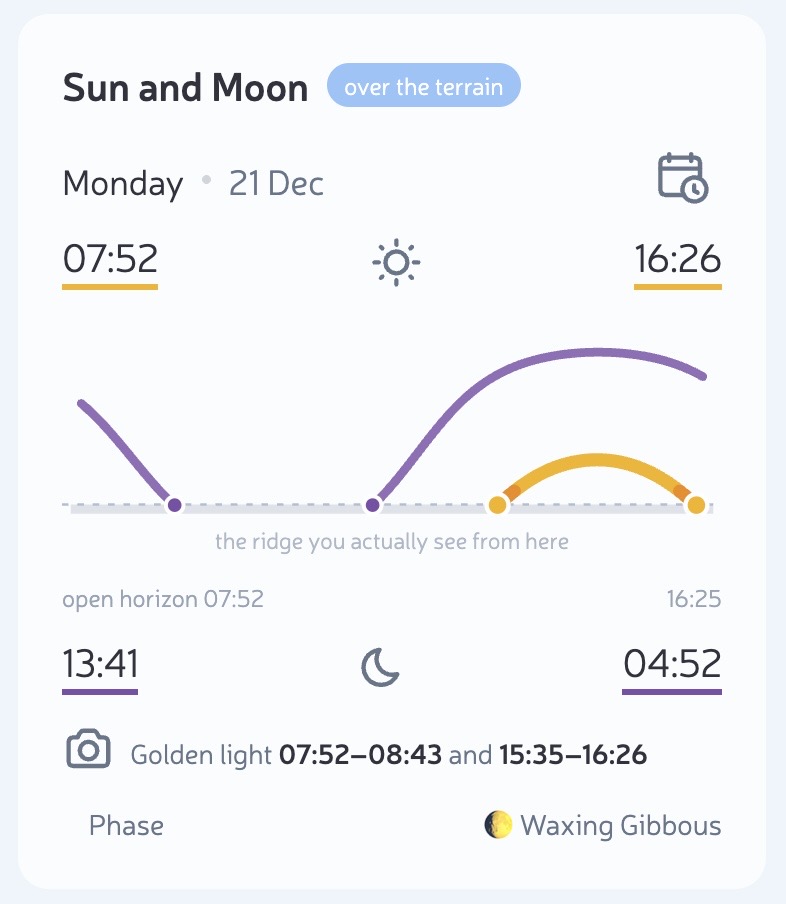
“Golden light” marks the periods when the Sun is visible and close to the local skyline. It isn't a forecast of the colour of the light or a preview of alpenglow on a particular face. Check the weather separately.
Other Photographs to Plan
First Light from a Shadowed Viewpoint
If your tripod stands below an eastern wall, the Sun may remain hidden well after open horizon sunrise. Comparing the two times helps you decide when to arrive: early enough to photograph the scene in shade, or closer to the moment the Sun clears the ridge.
The Moon Beside a Summit
Follow the purple path to see where the Moon crosses the ridge. Change the date, check its phase, and compare its position with the summit you want in the frame. You choose the dates yourself; there is no automatic search for lunar alignments.
What the Model Does Not See
The skyline comes from the mountain model. Trees and buildings can still block your view, and clouds or haze can hide the Sun. Use the panorama to plan a composition, then check the actual sightline when you arrive.
A winter sunrise on Dürrenstein means a mountain ascent in the dark, with possible snow and ice. Check the avalanche bulletin and weather close to departure, confirm access and local restrictions, and choose a route and equipment suited to the conditions and your experience. Allow time to set up safely and plan your descent as carefully as the climb.
Before You Leave
Open the view of the Tre Cime from Dürrenstein and choose 21 December 2026. Move through sunrise, then compare a few nearby dates for your own shot. Save the views you want to return to.